Do you want to taste the OVHcloud water? If so, signing up for an OVH free trial would be a wise move that would provide 30 days of free usage.
However, for more resources, powerful hardware, super scalability, ironclad security, award-winning 100% uptime, and 24/7 human support, you can go with Kamatera for 30 days at no cost.
Now the post will teach you how to easily claim the offer like a boss.

Table of Contents
Unlock 5x More Performance
How to Get a Free Trial of OVHcloud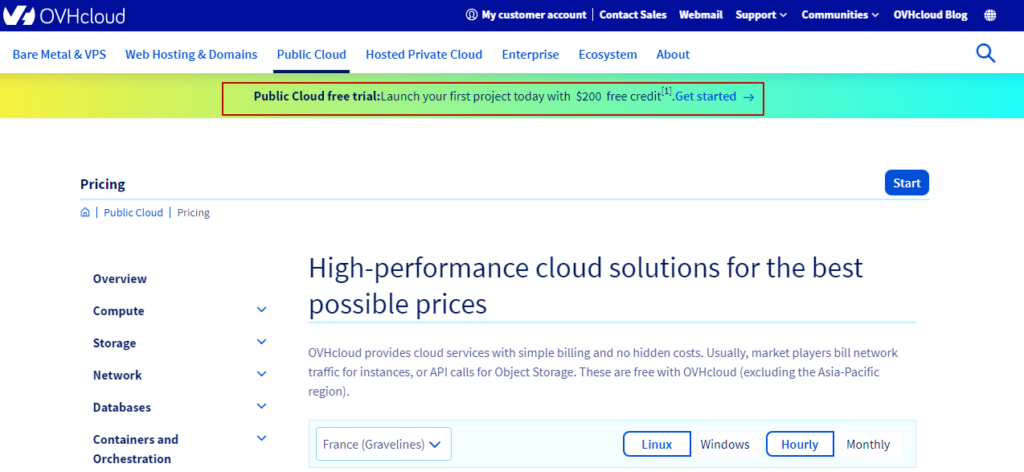
Want to test OVHcloud like a pro? You get a $200 free credit for 30 days to try out their public cloud. Just follow a simple sign-up process, start your project, and the “FREETRIAL” promo code applies automatically.
Yes, you need to link a credit card or PayPal for identity verification. Credit cards aren’t charged, but PayPal will deduct $30 (usable post-trial). You’ll unlock access to tons of features—from AI workloads to WordPress installs.
🔄 Not impressed?
Kamatera is a beast! With ultra-low latency, 100% uptime, and dedicated support, their free trial gives you $100 in credit and enterprise-grade performance—ideal for developers and startups alike.
✅ What You Get:
- Pre-installed apps (Docker, WordPress, OpenVPN)
- Popular OS (Windows, Ubuntu, Fedora & more)
- High-performance compute, ML, and storage tools
- Instant snapshots & backups
- Launch servers, host games, run AI – all in one dashboard
- Perfect for bloggers, devs, SaaS startups, and cloud-curious learners.
Signing up for the trial is simpler.
On most cloud platforms, users need to create a project after completing the account creation process. However, in order to sign up for OVHcloud, you must first start a project.
Let’s get started with the easy steps.
1. Click the free trial link to be redirected to the sign-in/sign-up page.
2. Fill out the sign-up form with the following information: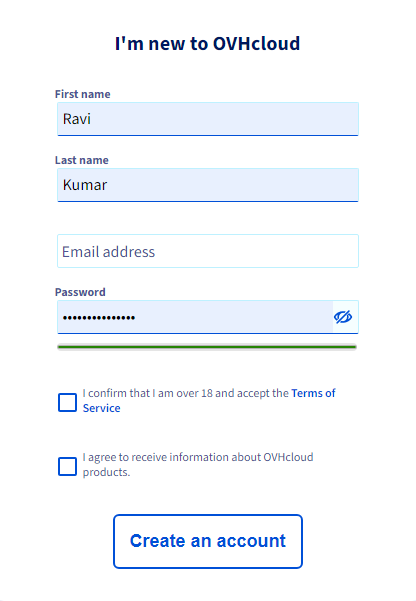
- First Name
- Last Name
- Email address
- Password
- Tick to accept the terms of service and hit submit Make an account
3. Confirm your email by copying the 6-digit validation code and pasting it.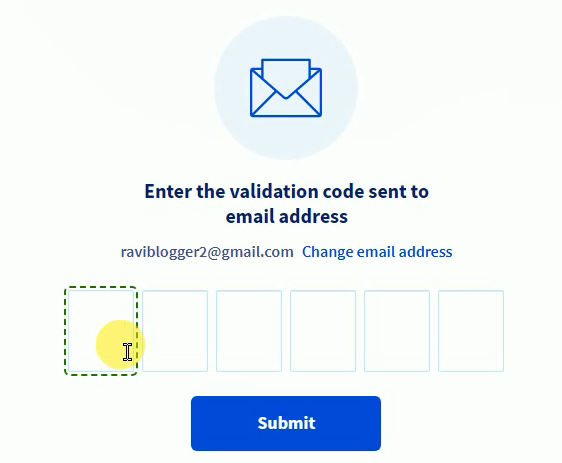
4. Agree to the cookie policy
5. Enter your contact information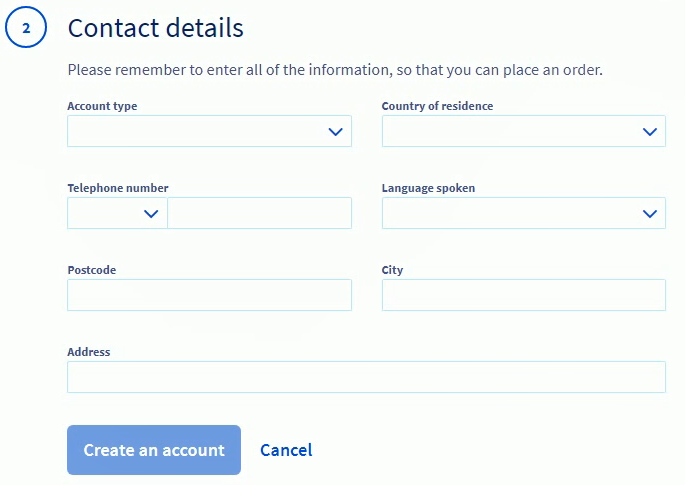
- Account type: personal
- Country
- Telephone number
- Language
- Postcode
- City
- Address
Hit create an account, you will now be in the OVHcloud control panel.
6. Click anywhere on the screen
7. Create your first public cloud project and proceed.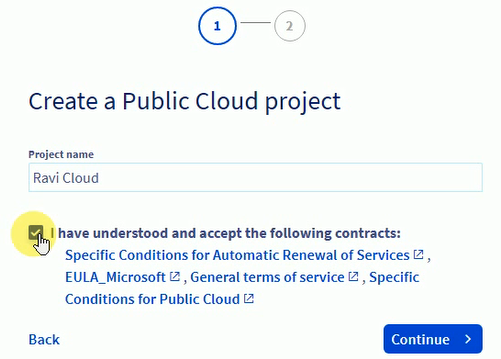
8. The “FREETRIAL” promo code will be automatically applied.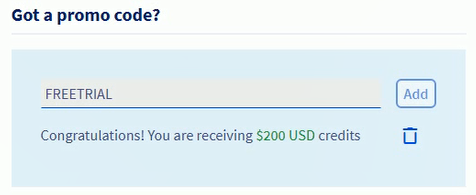
9. In the Confirm Your Identity section, you need to link your credit card or Paypal. With Paypal, you will be charged $30 as an upfront fee to confirm that it works properly.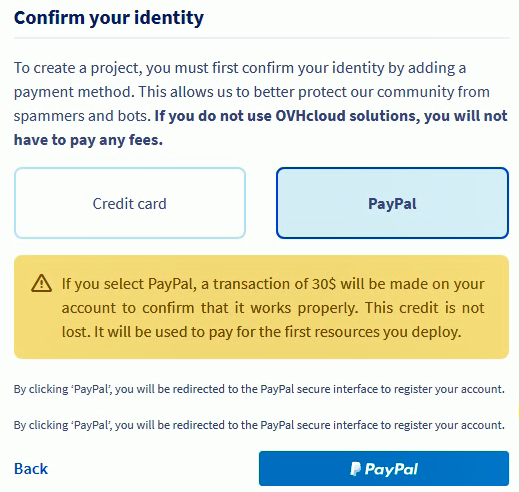
However, the amount you can use after trial expires. While the credit card option is not chargeable until the trial period ends.
You will receive a free $200 credit to use their public cloud after linking one of them.
OVHcloud Alternative
Kamatera has done a tremendous job in recent years. They have heavily invested in improving their cloud server performance, security, and reliability. We noticed the result-oriented changes in our independent test, as their server was able to achieve God-level 100% uptime and TTFB ~20 ms.
Diagonal scaling is their core identity, and 100+ one-click apps assist beginners in launching their first web property on the cloud. These two features eliminate the need for developers and allow you to choose exactly what resource you need.
You will find a cloud firewall, DDoS protection, and disaster recovery management protecting you from the front.
Moreover, if you get stuck somewhere, their support on calls, email, and live chat is ready to help you.

What products are available?
OVHcloud offers a wide range of products for testing during the free trial period. Its products can meet the needs of anyone, from a SaaS owner to a blogger.
- Pre-installed applications such as WordPress, Docker, Gitlab, Open VPN, Plesk, etc
- Popular OSs such as Windows, Ubuntu, Debian, CentOS, Fedora, Arch Linux, and CoreOS
- Machine learning models, NVIDIA NGC, data collectors, and data computation
- Block storage, cloud archive, object storage, volume snapshot, and instant backup
OVH Promo Code for Free Trial
You can use the promo code “FREETRIAL” to get a discount. It is only applicable to their public cloud product.
A credit card must be linked. There will be no charge until the free trial period expires or the resources exceed $200 in credit.
You can also link a PayPal account, but you will need to deposit $30 into your OVH cloud account to ensure that your PayPal is active.
What can you do under the offer?
- Web Server
- Game Server
- AI and computation
- Databases server
- Data storage
Who is eligible to participate in the trial?
It is appropriate for a blogger, start-up, SMB, or corporation. They should not be old users of the platform.
FAQ
1. Is the OVHcloud free trial really free for 30 days?
Yes. You get a full 30 days of free access with a generous 200 dollar credit. You can test everything from compute to storage to AI tools without spending a single rupee. The only thing you must complete is identity verification through a credit card or PayPal. Credit cards are not charged. PayPal will deduct 30 dollars, which becomes usable after your trial ends.
2. Do I need a credit card to unlock the 200 dollar free credit?
Yes, identity verification is mandatory. You can link either your credit card or PayPal. A credit card is the smoother option since it does not charge you until the trial ends. PayPal deducts 30 dollars as a verification fee, but the amount stays inside your account balance and can be used later.
3. What products can I test during the OVHcloud trial?
You can experiment with almost everything they offer. WordPress, Docker, and GitLab come pre-installed. You get access to popular operating systems, including Windows and Ubuntu. Machine learning tools, NVIDIA models, block storage, object storage, and instant snapshots are all available. It is powerful enough for developers, SaaS builders, and bloggers.
4. How does the promo code work for new users?
The “FREETRIAL” promo code is automatically applied the moment you create your first public cloud project. You do not need to type anything manually. Once identity verification is done, the 200 dollar credit unlocks instantly.
5. What can I build under this free trial offer?
Anything you want. The most popular use case is running web servers and game servers. Many users deploy AI workloads, data processing jobs, and database servers. Some simply test different operating systems and pre-installed apps. The free credit is more than enough to play like a pro.
6. Who is eligible to join the OVHcloud free trial program?
The offer is open to anyone who is a new user. Bloggers, students, developers, small businesses, and large enterprises can all take advantage of the trial. Old accounts or previously active customers are not eligible. As long as you are starting fresh, you are completely good to go.

Ravi Kumar is a Server Performance Analyst with over 4 years of experience benchmarking cloud infrastructure. He has optimized and stress-tested over 150+ websites, digging deep into uptime, disk latency, and CPU performance. Whether you’re looking for a free trial or a high-performance production server, Ravi uses real-world data to help you find the perfect host.