Are you thinking about closing your Linode account? We get it—things change, and so do your tech needs. Maybe you found a different cloud provider, or you’re just tidying up your online stuff. No worries; we’re here to help you say goodbye to Linode without any hassle.
In this easy-to-follow guide, we’ll walk you through the simple steps to delete your Linode account. It’s like clearing out old stuff from your closet, but in the digital world. So, if you’re ready to take control of your online space and start fresh, keep reading to learn how to delete your Linode account.
By the way, you can try Kamatera for free for 30 days, an ideal substitute for Linode if you need a change. The cloud offers enterprise-grade infrastructure with 2.7 GHz Intel Xeon chips, SSDs, storage, and 10 GBPS port speed for small to large projects.
By the way, if you want to leave Linode for Paperclip and Openclaw, check out the reliable and affordabe VPS with installation guides.

Table of Contents
Unlock 5x More Performance
How To Cancel Linode Subscription
This is an extremely destructive action. Closing your account means that all services, volumes, DNS records, etc. will be lost and may not be able to be restored.
So before initiating the process, I would suggest you take a full backup of your Linode projects and make sure, due to the action, you won’t lose any data. Now delete all properties and servers on Linode.
Let’s proceed with the account deletion tutorial.
1.Log in to your Linode account.
2.Click the down arrow that is aligned with your name.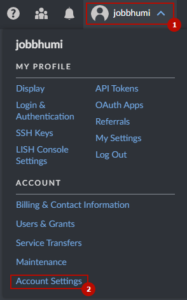
3.Hit Account Settings
4.Scroll to the bottom and hit the close account button.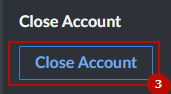
5.A confirmation box will pop up. Fill in your Linode username to confirm, and you can also leave your feedback. Hit the bottom-close account button for the last time.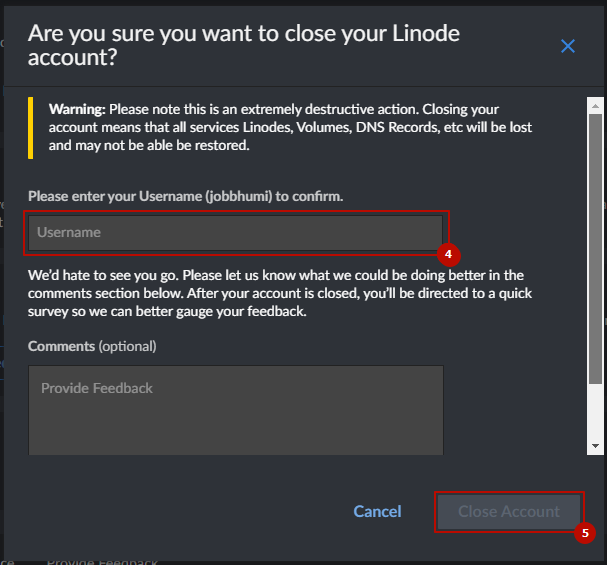
6.Instantly, the host will charge any past-due balance or uninvoiced balance.
After all the above actions, they will mark all of your services for deletion and your account for cancellation immediately. You won’t be able to log back into Linode.
How To Get an Instant Refund From Linode
Linode has a clear refund policy. As per their policy, you can request a refund for any positive account balance, excluding promotion credits.
You can also receive a full refund as part of their cancellation policy if you cancel within the first 7 days.
To request a refund, you can contact their support team via multiple channels, like email, phone, and ticket systems.
Note– Refunds are only available for payments made within the last 180 days. The refund is sent to the original payment method once the request is approved. With the exception of canceling an account within the first 7 days, all refunds are subject to a $5 processing fee.
Alternative
Kamatera has done a tremendous job in recent years. They have heavily invested in improving their cloud server performance, security, and reliability.
We noticed the result-oriented changes in our independent test as their server was able to achieve God-level 100% uptime and TTFB ~20 ms.
Diagonal scaling is their core identity, and 100+ one-click apps assist beginners in launching their first web property on the cloud. These two features eliminate the need for developers and allow you to choose exactly what resource you need.
You will find a cloud firewall, DDoS protection, and disaster recovery management protecting you from the front.
Moreover, if you get stuck somewhere, their support on calls, email, and live chat is ready to help you.
FAQ
1. Can I permanently delete my Linode account from the dashboard?
Yes, you can delete your Linode account directly from the Akamai Cloud Manager dashboard. However, this is a permanent action—all instances, volumes, DNS records, and backups will be irreversibly removed. Before closing your account:
- Backup all essential data.
- Delete all active services.
Then navigate to Account Settings > Close Account, confirm your username, and finalize the closure.
2. Am I eligible for a refund after deleting my Linode account?
Yes, Linode offers two types of refunds:
- Full Refund: If you cancel within 7 days of your first payment.
- Partial Refund: For any positive balance (excluding promo credits), provided the payment was made within the last 180 days.
A $5 processing fee may apply unless you’re within the 7-day cancellation window. Refunds are processed to your original payment method.
3. What is the best way to request a refund from Linode?
To request a refund:
- Open a support ticket from your Linode dashboard.
- Or contact their team via email or phone.
Be sure to include: - Your registered email,
- Reason for refund,
- Details of your recent payment (within 180 days).
- Refunds are usually reviewed and processed within 3–5 business days.
4. What’s a good alternative to Linode for cloud hosting in 2025?
Kamatera is a strong alternative. It provides:
- Enterprise-grade infrastructure with Intel Xeon CPUs,
- SSD storage and 10 Gbps ports,
- 100+ 1-click apps (WordPress, cPanel, etc.),
- Diagonal scaling to upgrade resources on the fly,
- Global data centers and 100% uptime in independent testing.
- Best of all, they offer a 30-day free trial with $100 credit, ideal for testing without commitment.
More Account Cancellation Guide
- How to Delete Hetzner Account & Get Refund Easily
- How To Delete Scalacube Account + Get Instant Refund
- How to Delete Netcup Account & Get Refund Easily
- How To Delete Vultr Account & Get A Fast Refund
- How To Delete UpCloud Account + Get A Instant Refund
- How to Delete DigitalOcean Account Easily + Get Refund
- How to Delete IONOS Account & Get Refund Easily
- How to Delete Contabo Account & Get Refund Easily

Ravi Kumar is a Server Performance Analyst with over 4 years of experience benchmarking cloud infrastructure. He has optimized and stress-tested over 150+ websites, digging deep into uptime, disk latency, and CPU performance. Whether you’re looking for a free trial or a high-performance production server, Ravi uses real-world data to help you find the perfect host.