You may find Scalacube is not perfect for you. because of limited server capacity or limited support options. Then you should get rid of the host account and move to a better host.
Hence, I have come up with a comprehensive guide to permanently deleting your Scalacube account. And also, you can know how you can get a refund.
By the way, for more gaming server capacity, more server locations, a more flexible support option, and blazing fast server speed, you can go with Kamatera. It also provides high-quality resources at an incredibly low cost.
By the way, if you want to leave Scalacube for Paperclip and Openclaw, check out the reliable and affordabe VPS with installation guides.
Now let’s start
Table of Contents
How To Cancel Scalacube Subscription
Before initiating the cancellation of the Scalacube subscription, we should delete all the active servers. If you think of a backup, you should do that. Now follow the steps to get rid of servers:
2.On the left sidebar, click Servers. 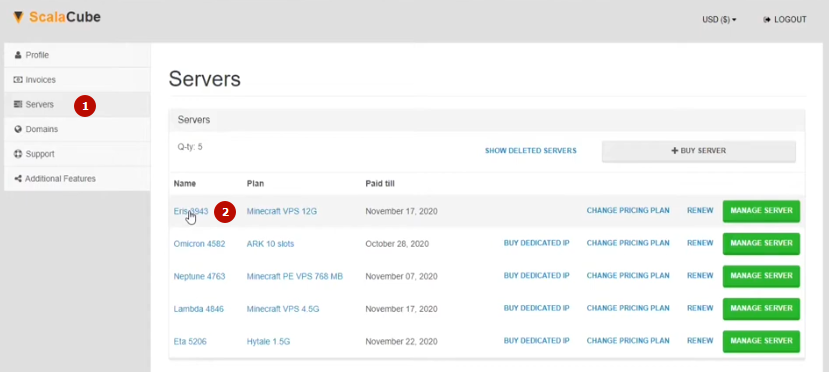 Now you will see a list of active servers in the main body.
3.Click name server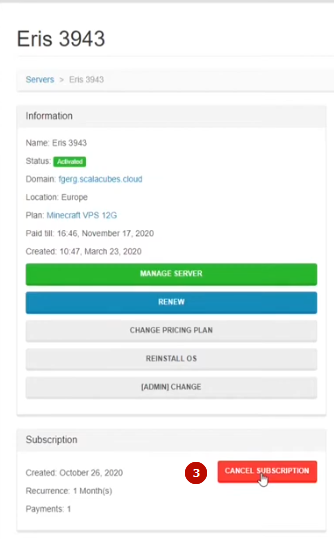
4.Scroll down and click cancel subscription
5.Write a reason for the cancellation.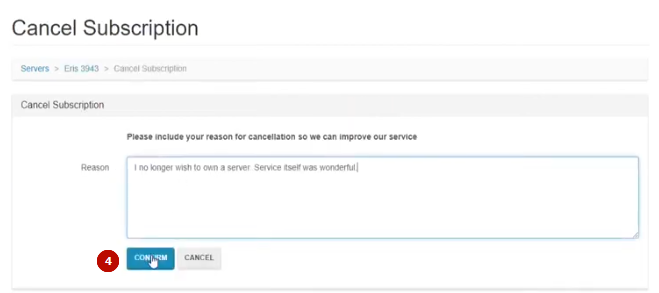
You can write, “I no longer wish to own a server. The service itself was wonderful! I can use it in the future.”
And click confirm. Now your server subscription will be canceled.
In this way, you can cancel the rest of the servers.
If you are done with the cancellation of your server subscription. Now proceed to cancel the main account.
They provide a delete button inside the dashboard. So we must contact their support team.
1.Head to support>New Ticket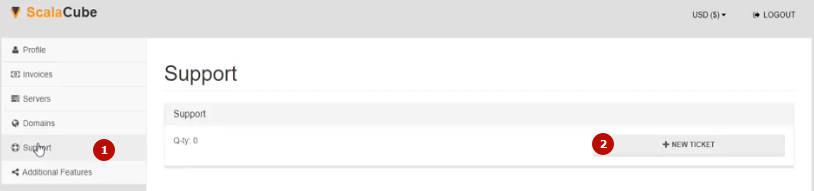
2.Choose others and send the request.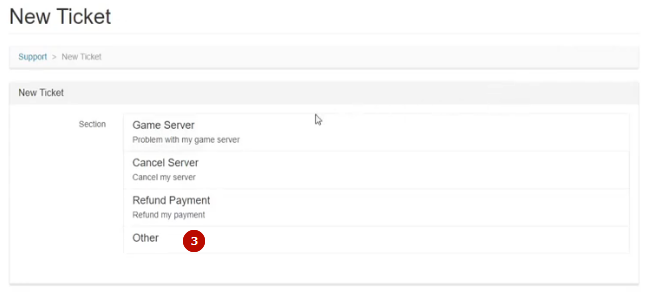
Hi Scalacube Support Team
I loved your web service [share your words]. I would like to use it in the future.
Right now, I don’t have such a plan.
So kindly delete my account permanently.
Thanks in advance
Ravi[Your Name]
They will respond to you in a few hours. I inform you that their experts will answer you Monday to Friday from 9 a.m. to 5 p.m.
You can also send the request directly to Scala Cube at support@scalacube.com. Their live chat won’t help you with regard to support issues.
Scalacube Alternative
Kamatera
Kamatera is a bigger beast than Scalacube, as they provide an enterprise-grade gaming server with a supersonic 22 MS TTFB and incredible 100% uptime.
They also come with 100+ one-click apps, including Minecraft. All of these are secured under N+1 redundancy, a 7-layer firewall, and DDoS protection.
Over-the-top daily backup and disaster recovery manage to keep users away from any data nightmare. If you need any help, hit up a 24/7 live chat, call, or ticket support. You can grab a free $100 credit to test the host freely.
How To Get Refund From Scalacube
Scalacube provides a 100% refund within 7 days of the payment being sent. You can even get a refund on auto-renewal if you apply within 10 days of the payment being sent.
FAQ
1. Can I delete my Scalacube account directly from the dashboard?
No. Scalacube does not provide a direct “Delete Account” button inside the dashboard.
First, you must cancel all active server subscriptions, and then contact the Scalacube support team via support ticket or email to request permanent account deletion.
2. Do I need to cancel all servers before deleting my Scalacube account?
Yes, this is mandatory.
Scalacube will not delete your main account if any active servers are still running. Make sure you cancel every server subscription and take backups (if needed) before contacting support.
3. How long does Scalacube take to respond to an account deletion request?
Usually, Scalacube responds within a few hours, but replies are limited to Monday–Friday, 9 a.m. to 5 p.m.
Account deletion is handled manually by their support team, so instant deletion is not possible.
4. Is Scalacube’s live chat useful for account deletion or refunds?
No. Scalacube’s live chat does not handle account deletion or refund requests.
You must raise a support ticket from the dashboard or send an email directly to support@scalacube.com
for these issues.
5. What is the best Scalacube alternative after cancellation?
If you want more gaming server capacity, better performance, and flexible support, Kamatera is a strong alternative.
It offers enterprise-grade servers, global locations, 24/7 support, and a free $100 trial credit, making it ideal for testing before committing.
More Account Cancellation Guide
- How to Delete Hetzner Account & Get Refund Easily
- How to Delete DigitalOcean Account Easily + Get Refund
- How to Delete Netcup Account & Get Refund Easily
- How To Delete Vultr Account & Get A Fast Refund
- How To Delete UpCloud Account + Get A Instant Refund
- How To Delete Linode Account + Get An Instant Refund
- How to Delete IONOS Account & Get Refund Easily
- How to Delete Contabo Account & Get Refund Easily

Ravi Kumar is a Server Performance Analyst with over 4 years of experience benchmarking cloud infrastructure. He has optimized and stress-tested over 150+ websites, digging deep into uptime, disk latency, and CPU performance. Whether you’re looking for a free trial or a high-performance production server, Ravi uses real-world data to help you find the perfect host.